Affordable AI Background Removers That Actually Work
Editor & Lead Reviewer, ToolsProZone
Free built-in tools are the cheapest background removers, and they cover light use well. For steady product listings, a low-cost subscription from Photoroom, PicWish or Canva Pro costs less per image than credits. Credits from remove.bg or Slazzer suit occasional bursts. Developers with thousands of images can self-host rembg or BiRefNet for free. Match the tool to your volume.
We may earn a commission if you buy through our links, at no extra cost to you.
Finding affordable ai background removers is easy. Finding ones that stay affordable is the hard part. Many tools advertise free cutouts, then charge for the full-size download.
You can lose an afternoon before you spot the catch.
Here's the spec that matters. Amazon Seller Central requires a pure white main image background (RGB 255,255,255) and at least 1000 pixels on the longest side for zoom. Plenty of free tiers export smaller than that.
Below, we break down each pricing model and where each tool earns its fee, starting with what "cheap" hides.
Affordable Ai Background Removers
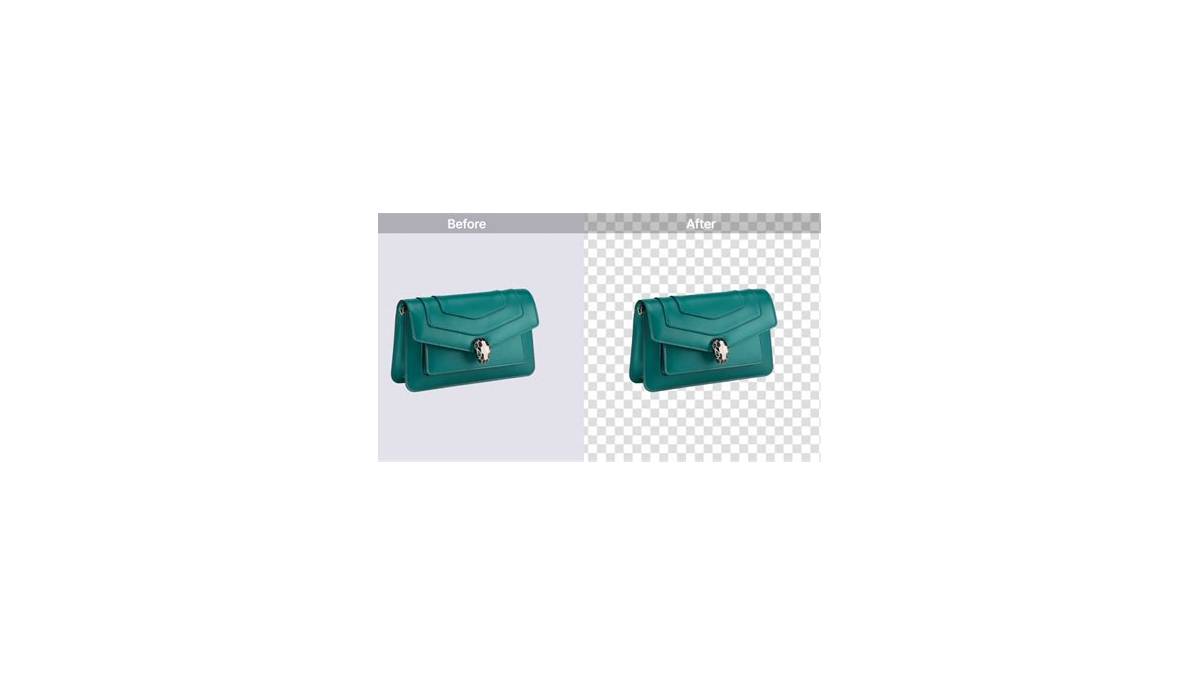
Affordable AI background removers cut subjects out of photos cheaply. Most charge per image or by monthly subscription. Free tiers often cap export size and add watermarks.
Phone tools and open-source models cost nothing. Your monthly image volume decides the best fit.
| Your situation | Budget route | Examples |
|---|---|---|
| 1 to 10 images a month | Free, built in | Apple Lift Subject |
| 20 to 300 images a month | Low-cost subscription | Photoroom, PicWish, Canva Pro |
| Occasional bursts | Pay-per-image credits | remove.bg, Slazzer |
| Thousands, technical user | Self-hosted, free | rembg, BiRefNet |
If you shoot on an iPhone and need a handful of cutouts, start free. If you list products weekly, a subscription usually beats credits.
Why Cheap Background Removers Aren't Always Cheap (and What to Check First)
The sticker price rarely tells the full story. The same four traps come up again and again in vendor pricing pages and user reviews.
- Preview-only free tiers. remove.bg's free download, for example, is capped at about 0.25 megapixels (roughly 625 x 400 px). Full-size files use paid credits.
- Expiring credits. Some credit packs lapse after a set period. Unused images are money lost.
- Auto-renewing plans. A monthly fee for a one-week project adds up fast. Set a cancel reminder the day you subscribe.
- Hidden cleanup time. A cheap tool that mangles hair costs minutes per image in manual fixes.
That last one hurts most. Fix 200 product photos at two extra minutes each, and you've burned almost seven hours.
What should you check before paying?
Check free export size, credit expiry, and commercial-use terms first. Then work through this list:
- Free export size in megapixels.
- Whether credits expire.
- Commercial-use terms on the free tier.
- Batch and API limits, if you need them.
- How easy cancelling is.
If any answer is unclear, treat it as a warning sign.
How We Judge Affordable AI Background Removers
We compare tools on one fixed scorecard built from vendor specs, pricing pages, and aggregate user reviews. Every tool faces the same criteria. That keeps the comparison fair.
The test set: hair, fur, glass, white-on-white, and jewellery
A good test set hits the weak spots. These six subjects expose most failures:
- Hair portrait: flyaway strands and soft edges.
- Fluffy pet: fur against a busy background.
- Glass bottle: transparency and reflections.
- White product on white: low contrast.
- Jewellery: tiny gaps and metallic shine.
- Clothing flat-lay: fabric edges and shadows.
A tool that handles the glass bottle cleanly will cope with most everyday product shots.
Cost per 100 images, free export size, and edge quality
Four measures drive the comparison:
- Cost per 100 images: plan price or credit price divided by images used.
- Free export size: megapixels you get without paying.
- Edge quality: how cleanly it handles hair, glass, and halo-free borders.
- Speed and batch support: seconds per image and bulk upload limits.
Cost per 100 images is the number most comparisons skip. It lets you weigh a free local model against a credit pack on equal terms.
Breakdown of the Best Budget Options
Photoroom and PicWish: low-cost subscriptions for sellers
Photoroom is a mobile-first editor that removes backgrounds, adds AI shadows, and resizes images for marketplaces. PicWish offers similar cutouts plus batch tools. Both suit sellers who list products weekly.
Subscriptions beat credits once you pass a few dozen images a month. Check the free tier's export quality and branding before you commit.
remove.bg and Slazzer: pay-per-image credits
remove.bg is the long-standing credit option. It offers an API plus Photoshop and Figma plugins. Slazzer uses a similar model.
Credits suit irregular bursts, like a seasonal catalog refresh. They're a poor fit for steady weekly volume.
Canva, Adobe Express, and Clipdrop: tools you may already pay for
Canva's Background Remover sits behind Canva Pro. Adobe Express includes a Remove Background tool in its editor. Clipdrop offers a quick web cutout with free limits.
If you already pay for one of these, use it first. You add no new bill.
Apple Lift Subject, rembg, and BiRefNet: free and local options
Apple's Lift Subject from Background works in Photos on iPhone and Mac, as Apple Support documents. It's free, and processing happens on your device.
rembg is an open-source Python tool that runs models like U²-Net locally. BiRefNet is a newer open model known for fine edges. Both use permissive MIT licences, but BRIA's RMBG models are non-commercial.
Setup takes technical comfort, so these fit developers and bulk jobs.
Side-by-Side Comparison: Pricing, Free Limits, Resolution, and Batch Support
Use this table to match a pricing model to your workflow. It stays broad on purpose because plan details shift often.
| Tool | Pricing model | Best for |
|---|---|---|
| remove.bg | Credits and subscriptions | Bursts, API users |
| Slazzer | Credits | Occasional bulk jobs |
| Photoroom | Subscription | Weekly product listings |
| PicWish | Credits and subscription | Budget batch work |
| Canva | Canva Pro subscription | Existing Canva users |
| Adobe Express | Free tier plus paid plan | Quick social graphics |
| Clipdrop | Free with limits, paid tier | One-off web cutouts |
| Apple Lift Subject | Free, built in | Casual phone users |
| rembg and BiRefNet | Free, self-hosted | Developers, high volume |
Here's how to read it:
- Under 10 images a month: go free and skip the subscription.
- Steady weekly listings: a subscription wins on cost per 100 images.
- Thousands of images: self-hosting wins, if you can handle setup.
As of 2026, plan names and limits change often. Confirm everything on the vendor's pricing page before you buy. Black Friday and Cyber Monday promos in late November often discount annual plans too.
Best Pick for Each Use Case: Etsy and Amazon Sellers, Creators, Developers, and Casual Users
Match the tool to your volume and your skills. If you list a few products a month, free beats paid. If you list weekly, a subscription wins.
- Amazon sellers: If you need pure white backgrounds and consistent canvas sizes, pick a subscription tool like Photoroom or PicWish. Both offer marketplace-ready resizing and batch uploads.
- Etsy and Depop sellers: If your photos are styled and lifestyle-heavy, use Canva Pro or Adobe Express. You may already pay for one, and you can add text and mockups in the same editor.
- Creators and social managers: If you make thumbnails and stickers, Clipdrop or Canva work well. Both are fast and run in a browser.
- Developers: If you process thousands of images, run rembg with BiRefNet locally. If you'd rather skip servers, remove.bg's API charges per call.
- Casual phone users: If you shoot on an iPhone, use Lift Subject from Background. It costs nothing and keeps files on your device.
Seasonal bursts are the one exception. If you refresh a catalog twice a year, credit packs from remove.bg or Slazzer cost less than twelve months of a plan you barely use.
One more rule: don't buy for the feature list. Buy for the subject you shoot most. A jewellery seller and a clothing seller need different edge handling.
Mistakes, Limits, and Legal Checks Before You Upload
Most cheap-tool disappointments come from a few predictable errors. Most legal trouble comes from skipping the terms of service.
Where cheap tools fail: hair, glass, shadows, and halos
Budget models struggle with the same things. Here's what to look for at 100% zoom, and the fix:
| Problem | What you'll see | Fix |
|---|---|---|
| Lost hair or fur | Choppy or clumped edges | Use the restore brush, or shoot against a plain backdrop |
| Glass and reflections | Bottle looks solid or half missing | Photograph on a contrasting background |
| Halo or fringe | Light outline of the old background | Run a second pass or erase the edge by hand |
| Floating product | No shadow, looks pasted on | Add an AI or drop shadow |
| White on white | Edges vanish | Shoot against a darker surface |
Good lighting prevents most of this. A sharp, high-resolution photo with strong contrast gives any model an easier job.
Commercial-use terms, upload privacy, and marketplace image rules
Check three things before you upload:
- Commercial use: Some free tiers restrict it. BRIA's RMBG models, for example, carry non-commercial terms.
- Privacy: Check whether the vendor deletes uploads and whether it trains models on them. This matters most for photos of customers or staff, which fall under GDPR if you serve EU users.
- Official ID photos: The U.S. Department of State doesn't accept digitally altered passport photos. Skip AI cutouts there.
Never edit away real defects on a product. That can break marketplace policy and consumer-protection rules.
Frequently Asked Questions
What is the cheapest AI background remover?
Free built-in tools are cheapest. Apple's Lift Subject from Background costs nothing on iPhone and Mac. Open-source models like rembg are also free but need technical setup.
Web services offer free tiers, but they usually cap export size or add a watermark.
Are free AI background removers good enough for product photos?
For simple subjects on clear backgrounds, yes. Free tiers often export below marketplace minimums, though. Amazon asks for at least 1000 pixels on the longest side.
Check the free export size first, then decide whether a paid tier is worth it.
Is a subscription or pay-per-image credits cheaper?
It depends on volume. Credits cost less for irregular bursts. Subscriptions win once you process dozens of images each month.
Compare cost per 100 images, and check whether your credits expire before you buy a large pack.
Can I use cutouts from free tools commercially?
Not always. Some free tiers and open-source models restrict commercial use. Read the licence or terms page before you sell anything made with the output.
If the terms are unclear, email the vendor or choose a tool that states them plainly.
Do AI background removers handle hair and glass well?
Not reliably at budget prices. Hair, fur, and transparent objects are the toughest cases. Expect to touch up edges with a restore brush.
Shooting against a plain, contrasting backdrop improves results far more than switching tools.
Our Verdict
Start free. Apple’s Lift Subject handles a handful of phone cutouts, and rembg costs nothing if you can self-host. If you list products weekly, a Photoroom or PicWish subscription beats buying credits once you pass a few dozen images a month. For bursts, remove.bg credits are the simple choice. Check free export size and commercial terms before you pay.

Similar Posts